'
'Guillermo Julca
'SW506- Assignment 2
'Spring 2006
'*********************************************************************************************
|
The Assignment 2 |
|
In this
Assignment, you will develop your own user defined control called
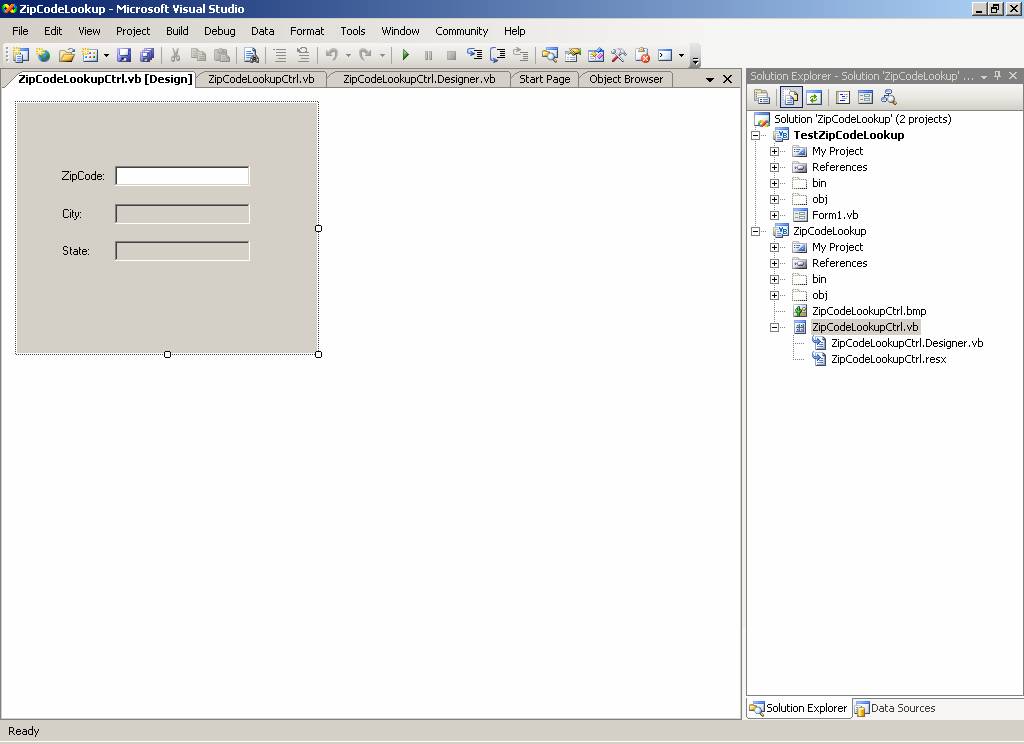
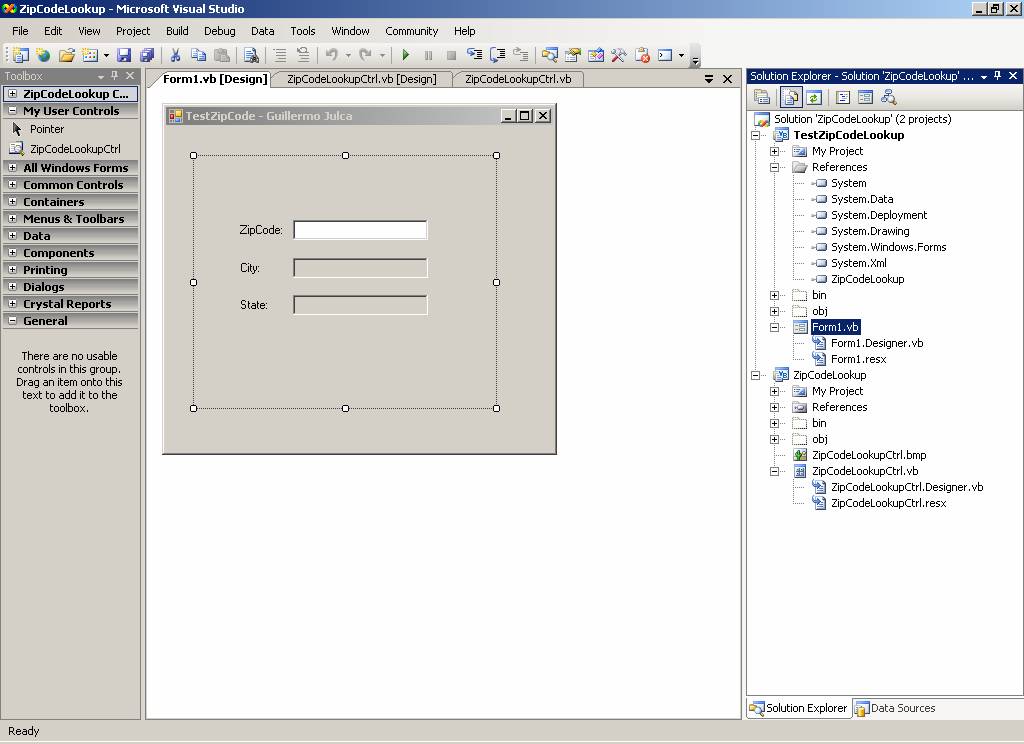
ZipCodeLookup. When placed on a Windows Form, it displays three labels
and textboxes. The first label/Textbox asks for input from the user for a valid
US Zip Code. Upon entering the zipcode, the control automatically fills in the
other two label/textboxes with City and State information corresponding to the
zip code .
§
Prepare
two projects within one blank solution
· Windows User Control: ZipCodeLookup:
· Windows Application : TestZipCodeLookup Add User Control on to Toolbox under My User Controls so you can drag it on to the form. Remember to add your name to the caption of the form.
§ How will you figure our city/state for each zip code.
· I want you to use a HASH TABLE
· Load the following MDB file's data into a HASH TABLE in your code.
· FOR THIS ASSIGNMENT, USE ONLY ZIPCODES FOR STATE OF CONNECTICUT otherwise the hash table is around 40,000 zip codes long. We'll use a different technique in the next homework assignment.
· When a zipcode is entered, quickly extract the necessary information from the HASH TABLE based on the zipcode as the "key" value.
§ Additional Restrictions
Here are some additional requirements.
· The Zip Code Textbox will only accept NUMERIC ENTRIES, 0 to 9 alone
· The Zip Code Textbox will only accept 5 numeric entries
· The other two text boxes cannot be "edited". Their contents can be selected and copied to clipboard but not changed.
· The ZipCodeLookup control will have a custom "bitmap" associated with that is visible in the Toolbox.
|
The Deliverables |
|
Both, hardcopy and floppy disk!
'*****************************************************************************************************
<ToolboxBitmap(GetType(ZipCodeLookupCtrl), "ZipCodeLookupCtrl")>
_
Public Class ZipCodeLookupCtrl
Private
blnIsNumericEntry As Boolean
Private
blnIsZipCodeLenLessThan6 As Boolean
Private
blnIsZipCodeLenEqualTo5 As Boolean
Private
ZipCodeHashTable As New
Hashtable()
Private Sub txtZipCode_KeyDown(ByVal
sender As Object,
ByVal e As
System.Windows.Forms.KeyEventArgs) Handles
txtZipCode.KeyDown
' Handle the
KeyDown event to determine the type of character entered into the txtZipCode
control.
' Determine
whether the keystroke is a number from the keypad Or
' Determine
whether the keystroke is a number from the top of the keyboard Or
' Determine
whether the keystroke is a backspace.
If
(e.KeyCode >= Keys.NumPad0 And e.KeyCode
<= Keys.NumPad9) _
Or
(e.KeyCode >= Keys.D0 And e.KeyCode <=
Keys.D9) _
Or
(e.KeyCode = Keys.Back) _
Then
' A
numerical keystroke was pressed.
' Set the
flag(blnIsNumericEntry) to true and evaluate in KeyPress event.
blnIsNumericEntry = True
Else
' A
non-numerical keystroke was pressed.
' Set the
flag(blnIsNumericEntry) to False and evaluate in KeyPress event.
blnIsNumericEntry = False
End If
' Handle the
KeyDown event to determine if the length of the txtZipCode control
' is not
greater than 5 digits.
If
(sender.TextLength <= 4) Then
blnIsZipCodeLenLessThan6 = True
If
(sender.TextLength = 4) _
And
(e.KeyCode <> Keys.Back) Then
blnIsZipCodeLenEqualTo5 = True
Else
blnIsZipCodeLenEqualTo5 = False
End
If
Else
If
(e.KeyCode = Keys.Back) Then
blnIsZipCodeLenLessThan6 = True
blnIsZipCodeLenEqualTo5 = False
Else
blnIsZipCodeLenLessThan6 = False
End
If
End If
End Sub
' The KeyPress
event occurs after the KeyDown event and we will use
' to prevent
non-numerical characters from entering the txtZipCode control.
Private Sub txtZipCode_KeyPress(ByVal
sender As Object,
ByVal e As
System.Windows.Forms.KeyPressEventArgs) Handles
txtZipCode.KeyPress
' Check for
the flag being set in the KeyDown event.
If
blnIsNumericEntry = False _
Or
blnIsZipCodeLenLessThan6 = False Then
' Stop
the character from being entered into the txtZipCode
' control
since it is non-numerical or it has a size greater than 5 digits.
e.Handled = True
End If
End Sub
'The KeyUp event
occurs when a key is released while the txtZipCode control has focus.
Private Sub txtZipCode_KeyUp(ByVal
sender As System.Object, ByVal e As
System.Windows.Forms.KeyEventArgs) Handles
txtZipCode.KeyUp
If
(blnIsNumericEntry) _
And
(blnIsZipCodeLenLessThan6 = True) _
And
(blnIsZipCodeLenEqualTo5 = True) _
Then
'To call
subroutine that will assign the City and State value for a specific
'Zipcode
target value for the corresponding "txtCity" and "txtState"
text boxes
GetCityAndStateForZipCodeTarget()
End If
If
(blnIsZipCodeLenEqualTo5 = False) Then
'To reset
the values for the "txtCity" and "txtState" text boxes
txtCity.Text = ""
txtState.Text = ""
End If
End Sub
Private Sub ZipCodeLookupCtrl_Load(ByVal
sender As System.Object, ByVal e As
System.EventArgs) Handles MyBase.Load
'To
initialize the "ZipCodeHashTable" with some ZipCodes for state of
ZipCodeHashTable.Add("06825", "
ZipCodeHashTable.Add("06824", "
ZipCodeHashTable.Add("06828", "
ZipCodeHashTable.Add("06905", "
ZipCodeHashTable.Add("06120", "
ZipCodeHashTable.Add("06601", "
ZipCodeHashTable.Add("06401", "
ZipCodeHashTable.Add("06810", "
ZipCodeHashTable.Add("06820", "
ZipCodeHashTable.Add("06512", "East
Haven~CT")
ZipCodeHashTable.Add("06855", "
ZipCodeHashTable.Add("06242", "Eastford~CT")
ZipCodeHashTable.Add("06612", "
ZipCodeHashTable.Add("06030", "
ZipCodeHashTable.Add("06320", "
ZipCodeHashTable.Add("06906", "Glenbrook~CT")
ZipCodeHashTable.Add("06830", "
End Sub
Private Sub GetCityAndStateForZipCodeTarget()
'This
subroutine will assign the City and State value for a specific
'Zipcode
target value for the corresponding "txtCity" and "txtState"
text boxes
Dim
strZipCodeTarget As String
Dim
strCity As String
Dim
strSate As String
Dim
strCitySate As String
strZipCodeTarget =
Trim(txtZipCode.Text)
'ContainsKey
will return true value if the "ZipCodeHashTable"
' contains an
element with the specified Zipcode (key); otherwise, false.
If
ZipCodeHashTable.ContainsKey(strZipCodeTarget) Then
strCitySate =
ZipCodeHashTable.Item(strZipCodeTarget)
strCity = Mid(strCitySate, 1,
InStr(strCitySate, "~",
CompareMethod.Text) - 1)
strSate = Mid(strCitySate,
InStr(strCitySate, "~",
CompareMethod.Text) + 1)
txtCity.Text = strCity
txtState.Text = strSate
End If
End Sub
End Class
‘*****************************************************************************************************************
‘******************ZipCodeLookupCtrl.Designer.vb******************************************************************
<Global.Microsoft.VisualBasic.CompilerServices.DesignerGenerated()>
_
Partial Class ZipCodeLookupCtrl
Inherits
System.Windows.Forms.UserControl
'UserControl1
overrides dispose to clean up the component list.
<System.Diagnostics.DebuggerNonUserCode()> _
Protected Overrides Sub
Dispose(ByVal disposing As Boolean)
If
disposing AndAlso components IsNot Nothing Then
components.Dispose()
End If
MyBase.Dispose(disposing)
End Sub
'Required by the
Windows Form Designer
Private
components As System.ComponentModel.IContainer
'NOTE: The
following procedure is required by the Windows Form Designer
'It can be
modified using the Windows Form Designer.
'Do not modify it
using the code editor.
<System.Diagnostics.DebuggerStepThrough()>
_
Private Sub InitializeComponent()
Me.lblZipCode
= New System.Windows.Forms.Label
Me.lblCity
= New System.Windows.Forms.Label
Me.lblState
= New System.Windows.Forms.Label
Me.txtZipCode
= New System.Windows.Forms.TextBox
Me.txtCity
= New System.Windows.Forms.TextBox
Me.txtState
= New System.Windows.Forms.TextBox
Me.SuspendLayout()
'
'lblZipCode
'
Me.lblZipCode.AutoSize
= True
Me.lblZipCode.Location
= New System.Drawing.Point(42, 66)
Me.lblZipCode.Name
= "lblZipCode"
Me.lblZipCode.Size
= New System.Drawing.Size(50, 13)
Me.lblZipCode.TabIndex
= 0
Me.lblZipCode.Text
= "ZipCode:"
'
'lblCity
'
Me.lblCity.AutoSize
= True
Me.lblCity.Location
= New System.Drawing.Point(42, 104)
Me.lblCity.Name
= "lblCity"
Me.lblCity.Size
= New System.Drawing.Size(27, 13)
Me.lblCity.TabIndex
= 1
Me.lblCity.Text
= "City:"
'
'lblState
'
Me.lblState.AutoSize
= True
Me.lblState.Location
= New System.Drawing.Point(42, 141)
Me.lblState.Name
= "lblState"
Me.lblState.Size
= New System.Drawing.Size(35, 13)
Me.lblState.TabIndex
= 2
Me.lblState.Text
= "State:"
'
'txtZipCode
'
Me.txtZipCode.Location
= New System.Drawing.Point(98, 63)
Me.txtZipCode.Name
= "txtZipCode"
Me.txtZipCode.Size
= New System.Drawing.Size(135, 20)
Me.txtZipCode.TabIndex
= 3
'
'txtCity
'
Me.txtCity.Location
= New System.Drawing.Point(98, 101)
Me.txtCity.Name
= "txtCity"
Me.txtCity.ReadOnly
= True
Me.txtCity.Size
= New System.Drawing.Size(135, 20)
Me.txtCity.TabIndex
= 4
'
'txtState
'
Me.txtState.Location
= New System.Drawing.Point(98, 138)
Me.txtState.Name
= "txtState"
Me.txtState.ReadOnly
= True
Me.txtState.Size
= New System.Drawing.Size(135, 20)
Me.txtState.TabIndex
= 5
'
'ZipCodeLookupCtrl
'
Me.AutoScaleDimensions
= New System.Drawing.SizeF(6.0!, 13.0!)
Me.AutoScaleMode
= System.Windows.Forms.AutoScaleMode.Font
Me.Controls.Add(Me.txtState)
Me.Controls.Add(Me.txtCity)
Me.Controls.Add(Me.txtZipCode)
Me.Controls.Add(Me.lblState)
Me.Controls.Add(Me.lblCity)
Me.Controls.Add(Me.lblZipCode)
Me.MinimumSize
= New System.Drawing.Size(250, 200)
Me.Name
= "ZipCodeLookupCtrl"
Me.Size
= New System.Drawing.Size(300, 250)
Me.ResumeLayout(False)
Me.PerformLayout()
End Sub
Friend WithEvents lblZipCode As
System.Windows.Forms.Label
Friend WithEvents lblCity As
System.Windows.Forms.Label
Friend WithEvents lblState As
System.Windows.Forms.Label
Friend WithEvents txtZipCode As
System.Windows.Forms.TextBox
Friend WithEvents txtCity As
System.Windows.Forms.TextBox
Friend WithEvents txtState As
System.Windows.Forms.TextBox
End Class
<Global.Microsoft.VisualBasic.CompilerServices.DesignerGenerated()>
_
Partial Class Form1
Inherits
System.Windows.Forms.Form
'Form overrides
dispose to clean up the component list.
<System.Diagnostics.DebuggerNonUserCode()> _
Protected Overrides Sub
Dispose(ByVal disposing As Boolean)
If
disposing AndAlso components IsNot Nothing Then
components.Dispose()
End If
MyBase.Dispose(disposing)
End Sub
'Required by the
Windows Form Designer
Private
components As System.ComponentModel.IContainer
'NOTE: The
following procedure is required by the Windows Form Designer
'It can be
modified using the Windows Form Designer.
'Do not modify it
using the code editor.
<System.Diagnostics.DebuggerStepThrough()> _
Private Sub InitializeComponent()
Me.ZipCodeLookupCtrl1
= New ZipCodeLookup.ZipCodeLookupCtrl
Me.SuspendLayout()
'
'ZipCodeLookupCtrl1
'
Me.ZipCodeLookupCtrl1.Location
= New System.Drawing.Point(29, 31)
Me.ZipCodeLookupCtrl1.MinimumSize
= New System.Drawing.Size(250, 200)
Me.ZipCodeLookupCtrl1.Name
= "ZipCodeLookupCtrl1"
Me.ZipCodeLookupCtrl1.Size
= New System.Drawing.Size(300, 250)
Me.ZipCodeLookupCtrl1.TabIndex
= 0
'
'Form1
'
Me.AutoScaleDimensions
= New System.Drawing.SizeF(6.0!, 13.0!)
Me.AutoScaleMode
= System.Windows.Forms.AutoScaleMode.Font
Me.ClientSize
= New System.Drawing.Size(387, 325)
Me.Controls.Add(Me.ZipCodeLookupCtrl1)
Me.Name
= "Form1"
Me.StartPosition
= System.Windows.Forms.FormStartPosition.CenterScreen
Me.Text = "TestZipCode
- Guillermo Julca"
Me.ResumeLayout(False)
End Sub
Friend WithEvents ZipCodeLookupCtrl1 As ZipCodeLookup.ZipCodeLookupCtrl
End Class
'
'Guillermo Julca
'SW506- Assignment 2
'Spring 2006
Public Class Form1
'This windows app
will test our "ZipCodeLookup" windows control
'Library Project.
End Class